
Stop Guessing What Is Happening on the Shop Floor With Manufacturing Operations Software
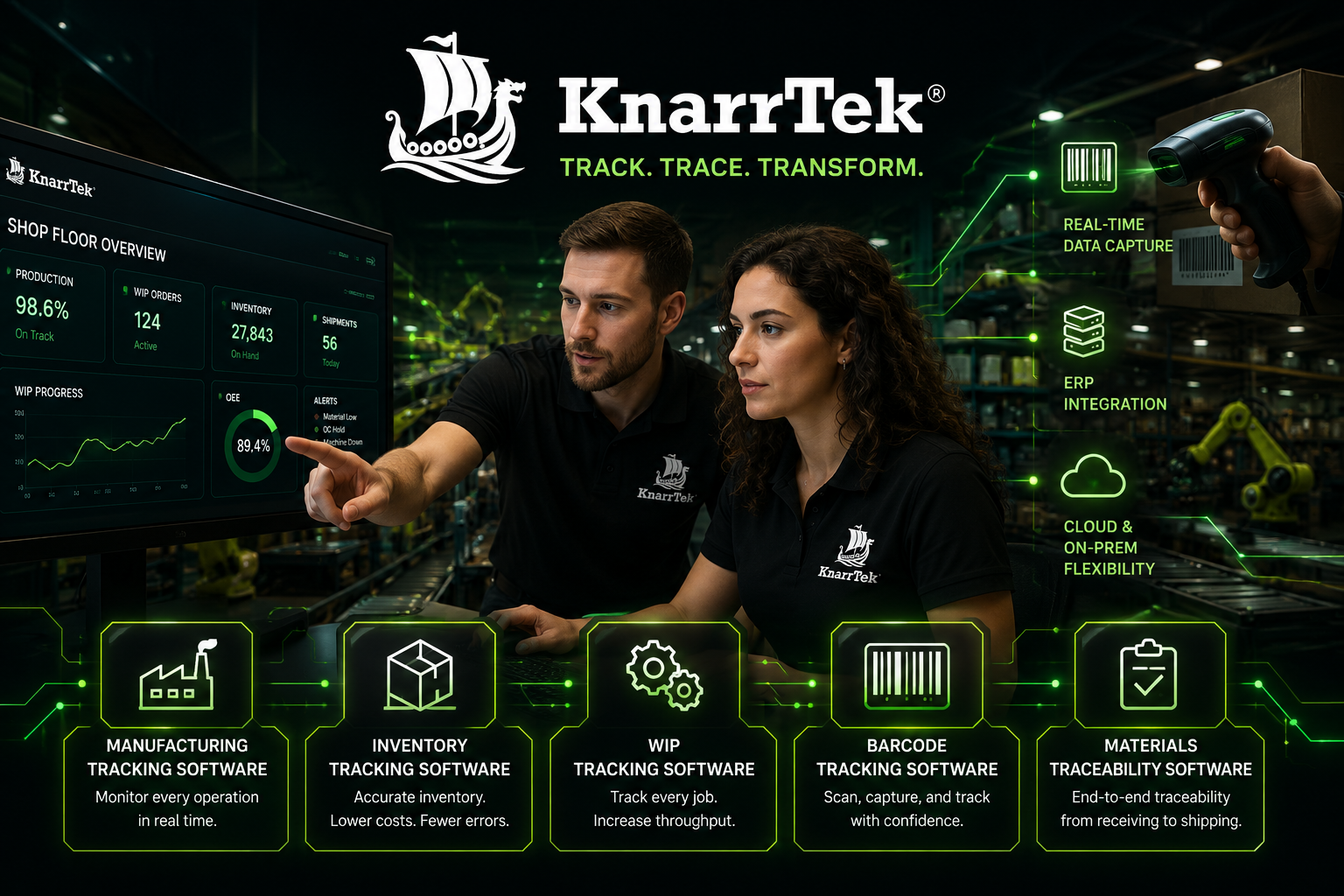
See exactly what is happening across your operation as it happens. KnarrTek captures production, inventory, warehouse, labeling, quality, traceability, and other critical floor activity at the point of work, giving your team the real-time visibility your ERP cannot provide on its own.
From receiving through shipping, KnarrTek connects MES, WMS, Track-and-Trace, barcode and RFID data, job progress, and ERP workflows into one controlled operational record. BellHawk Online, WIPtracker, and SmartOps24x7 capture that activity at the point of work, then share selected data with your ERP, so you can see the operation without replacing the systems you already run.
- Barcode + RFID
- MES + WMS
- Track-and-Trace
- ERP Integration
What Is Manufacturing Operations Software?
Manufacturing operations software records what happens on the floor and in the warehouse as it happens: materials received, stock moved, jobs started and finished, labor logged, quality checks passed or failed, and orders shipped. It gives you real-time inventory, production, warehouse, and traceability visibility in one operational record that your team and your ERP can both rely on.
Most companies already have an ERP, but it does not usually capture the real activity happening on the floor. Materials are received, moved, staged, consumed, packed, labeled, inspected, and shipped long before the full story is reflected in the business system.
KnarrTek closes that gap by capturing real-time operational activity where the work happens. The platform connects inventory movement, production updates, barcode scans, RFID reads, label activity, quality records, job status, and traceability events into one controlled workflow.
Capture Activity as It Happens
Record receiving, putaway, staging, production, inspections, label events, packing, and shipping in real time instead of rebuilding the history later.
Connect Floor Data to Business Visibility
Give teams a clearer view of inventory, jobs, materials, labels, quality status, and traceability records without relying on scattered updates.
Reduce Manual Records and Blind Spots
Replace spreadsheets, handwritten notes, delayed entries, and disconnected systems with a more controlled and reliable operational record.
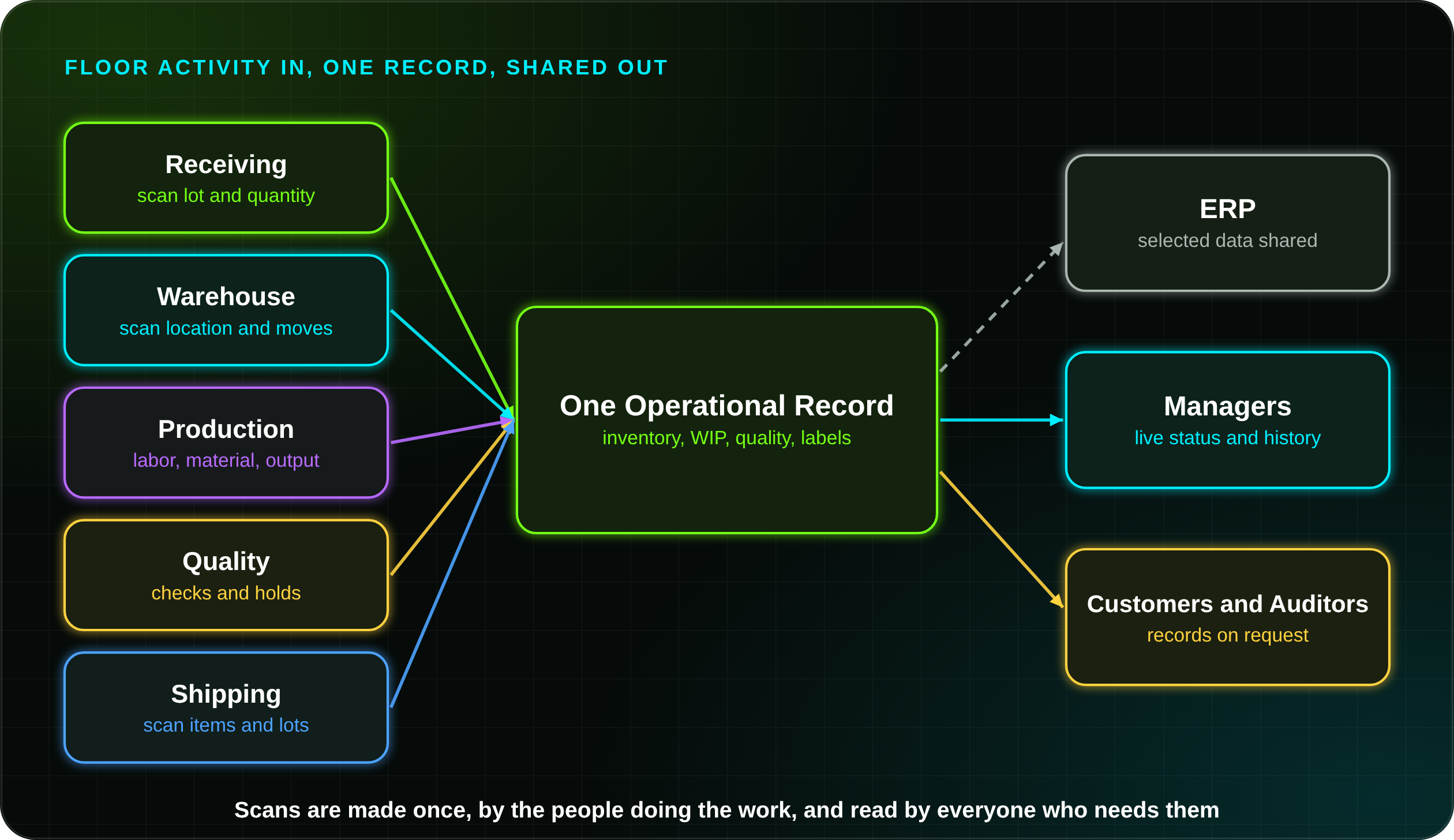
Manufacturing operations software is not a replacement for planning, accounting, or purchasing. It sits between the work and those systems. Operators and warehouse staff scan and confirm what they do, and everyone else, from schedulers to quality managers to customer service, reads the same current record.
That is why KnarrTek builds it around the people doing the work: simple scan-and-confirm screens at the point of use, and shared views for the people who plan, buy, and ship.
The Gap Between the ERP and the Shop Floor
An ERP records transactions. It depends on people to enter them, usually after the fact. These are the gaps that KnarrTek manufacturing operations software is built to close.
Spreadsheets and Paper
Side spreadsheets and paper travelers hold the real detail, but only the person who made them can see it.
Delayed Updates
When inventory and job status are keyed in at the end of a shift, planners work from yesterday’s picture.
Manual Reconciliation
Staff spend hours matching counts, labels, and paperwork to the system instead of moving product.
Blind Spots
Material in staging, work waiting between operations, and items on hold are hard to find when no one scans them.
Connected Manufacturing Operations Software for Production, Warehouse, Inventory, and Traceability
KnarrTek manufacturing operations software supports the workflows that determine whether inventory is accurate, production is visible, labels are correct, quality records are complete, and shipments can be traced. The platform connects MES and WMS software, Track-and-Trace software, inventory visibility software, barcode tracking software, RFID tracking software, job tracking, and ERP-connected activity in one controlled operational layer.
Production Visibility for Real Operational Activity
Track work orders, job progress, routes, operators, material usage, labor records, machine activity, scrap, rework, production output, and WIP movement.
View Manufacturing Tracking Barcode TrackingUse Every Scan as a Controlled Transaction
Barcode workflows identify items, lots, serial numbers, containers, pallets, bins, assets, work orders, labels, employees, machines, shipments, and customer orders.
View Barcode Tracking RFID TrackingCapture Movement Faster When Scanning Is Not Enough
RFID can support higher-volume tracking for materials, containers, assets, pallets, reels, and controlled inventory movement while connecting activity to records.
View RFID Tracking WIP TrackingKnow What Is Active, Delayed, Complete, or Waiting
WIP tracking helps teams see where jobs are, what has been completed, which materials were consumed, what steps remain, and where bottlenecks exist.
View WIP Tracking Inventory & Asset TrackingImprove Control Over Every Material and Location
Track inventory across receiving, putaway, movement, staging, production issue, cycle counting, quality hold, packing, shipping, and multi-site operations.
View Inventory Tracking Track & TraceConnect Source Materials to Finished Goods and Shipments
Capture lot numbers, serial numbers, genealogy, supplier data, production history, inspection results, label history, shipment activity, and customers.
View Traceability Software Job TrackingFollow Materials, Labor, People, and Progress Together
Job tracking connects production activity, inventory movement, labor entries, route steps, work centers, materials, quality checks, and status updates.
View Job Tracking Roll ConvertingTrack Parent Rolls, Child Rolls, Scrap, Labels, and Genealogy
Support converting workflows where rolls, reels, webs, cuts, trims, production runs, material usage, quality checks, labels, and finished goods need history.
View Roll Converting Secure Hybrid DeploymentSupport Controlled Data for Cybersecurity Readiness
Use cloud, on-premise, and hybrid deployment strategies to help reduce uncontrolled spreadsheets, improve access control, and strengthen operational records.
View Cybersecurity ReadinessManufacturing Operations Software Packages: Choose the Right Level of Control
KnarrTek manufacturing operations software packages support different operational starting points. Some teams need cloud-based tracking to replace spreadsheets. Others need on-premise MES and WMS control for production, warehouse, quality, and traceability workflows. More complex operations may need intelligent agents, alerts, rules, and integrations. Compare the packages side by side.
BellHawk Online
BellHawk Online is a browser-based inventory and production tracking system for companies that need practical barcode scanning, job visibility, and inventory control without a large on-premise installation.
- Inventory, container, lot, asset, and material tracking.
- Production tracking, labor records, work orders, and WIP updates.
- Browser-based access for approved users and scanning devices.
- Useful starting point for operational visibility.
WIPtracker
WIPtracker is built for manufacturing and warehouse operations that need deeper shop-floor control, on-premise deployment, production tracking, QA workflows, and traceability.
- MES, WMS, QA, scheduling, dispatching, labeling, and reporting.
- Raw material, WIP, finished goods, container, and shipment tracking.
- Barcode, RFID, label printing, and local plant-floor transactions.
- Strong fit for complex production and warehouse operations.
SmartOps24x7
SmartOps24x7 uses MilramX-powered rules, alerts, intelligent agents, integrations, and exception monitoring to keep operational data moving between people, devices, systems, and reports.
- Rules-based monitoring, alerts, and intelligent-agent workflows.
- ERP, printer, scanner, RFID, scale, PLC, and system integration.
- Automated reporting, exception handling, and data movement.
- Designed for connected oversight across operations.
BellHawk is the data capture engine behind all three packages. It records receiving, storage, production, quality, and shipping activity. Read about BellHawk materials tracking, or try BellHawk with a trial.
MilramX adds decision support and integration on top of that data. It is how selected information reaches your ERP and other business systems. Read about MilramX.
- Start small. Begin with one workflow, such as receiving or WIP, and add more later.
- Keep your ERP. KnarrTek complements it and does not replace it.
- Choose how it runs. Cloud, on-premise, or hybrid, depending on your IT requirements.
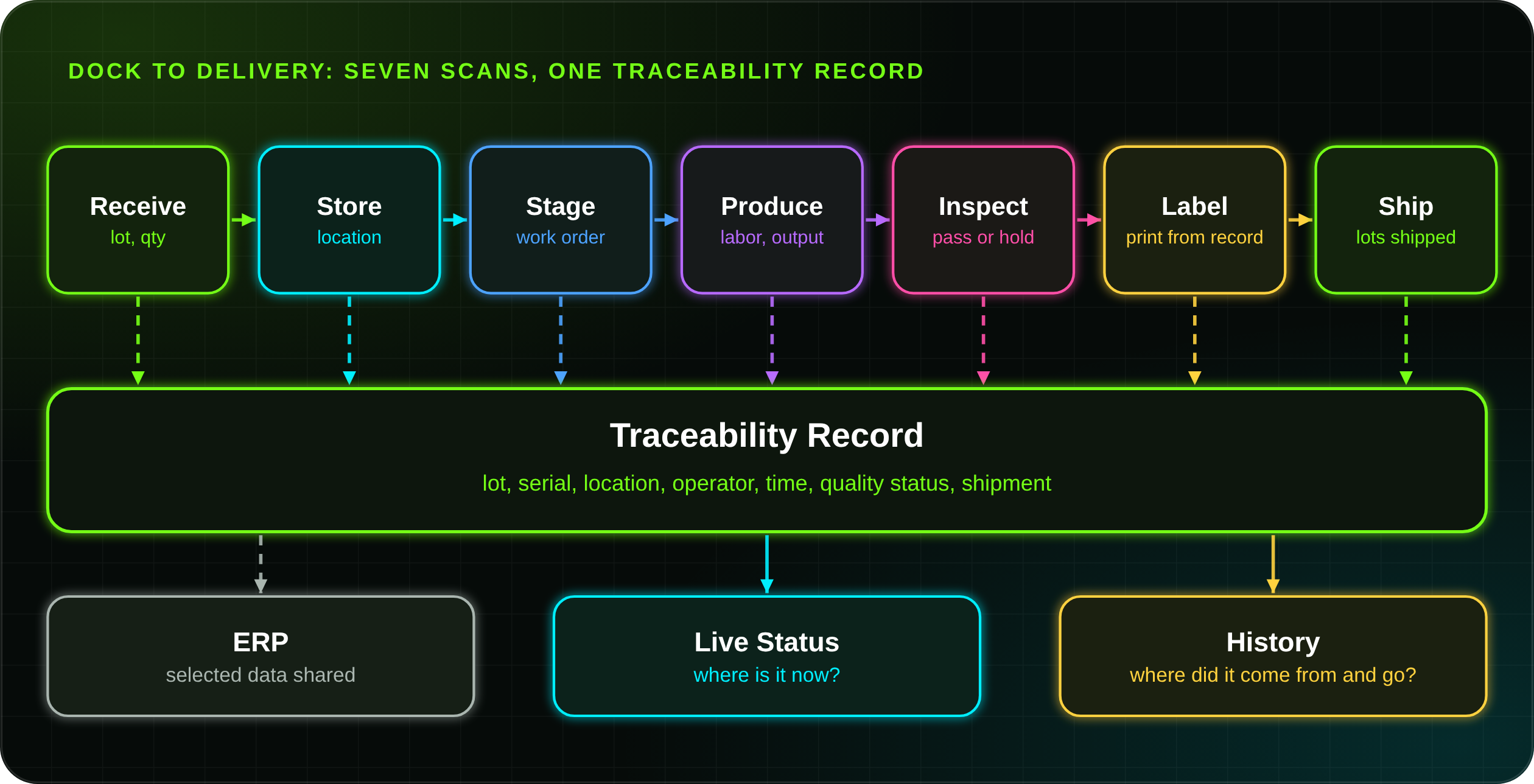
Track Every Move From Dock to Delivery
KnarrTek follows the actual path of materials, jobs, labels, containers, people, and shipments. Each transaction strengthens the operational record so teams can see what happened, where it happened, who completed it, and what should happen next. Manufacturing operations software follows material through your building, from receiving to shipping.
Receive
Capture supplier, item, lot, quantity, label, and receiving location data.
Store
Move materials into bins, racks, pallets, freezers, stockrooms, or controlled zones.
Stage
Prepare materials for jobs, kits, batches, customer shipments, or internal requests.
Produce
Record labor, material usage, WIP movement, scrap, rework, and production output.
Inspect
Connect inspections, approvals, holds, nonconformance activity, and quality history.
Label
Print and verify barcode, RFID, lot, serial, carton, and pallet labels.
Ship
Validate orders, quantities, customers, containers, labels, and shipment records.
One Scan, One Updated Record
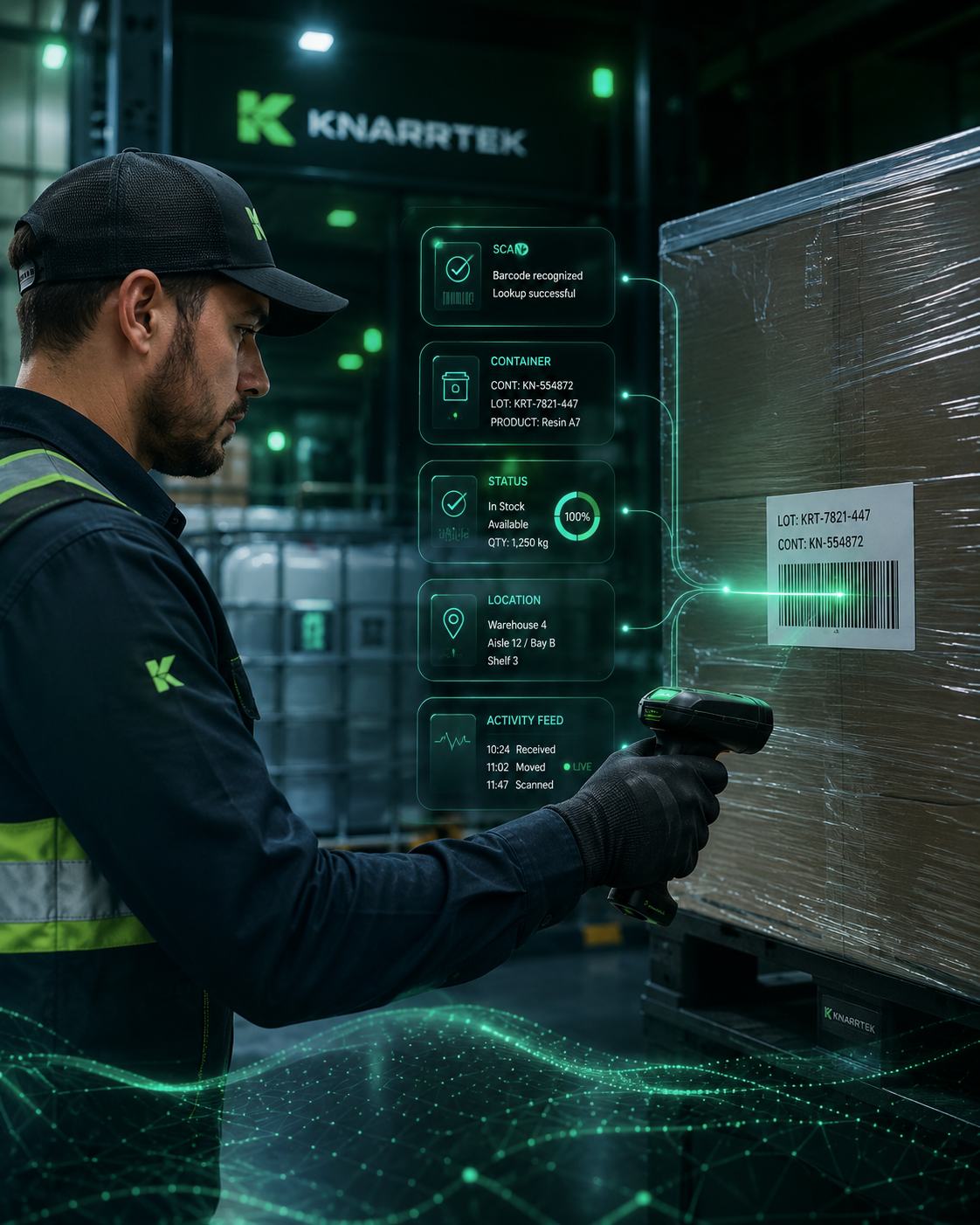
The scan is the unit of work. When an operator scans a pallet label, the item, lot, quantity, location, and status are checked against the record and updated in the same moment. If something does not match, the operator finds out at the pallet, not at month-end.
- At the dock: confirm what arrived against the order.
- In the warehouse: confirm put-away and moves by location.
- At shipping: confirm the lots and quantities that left the building.
Manufacturing Operations Software for Operations Where Traceability Matters
KnarrTek serves manufacturers, processors, warehouses, distributors, and regulated organizations that need better control over materials, labor, labels, quality, inventory movement, shipment history, and ERP-connected operational records. Each industry page describes how KnarrTek manufacturing operations software applies to that kind of work.
Aerospace
Serial and lot history for tightly controlled parts.
View aerospaceAutomotive
Supplier lot control and high-volume part flow.
View automotiveBiotechnologies
Material, batch, and storage records for regulated work.
View biotechnologiesChemicals
Batch, container, and hazardous material tracking.
View chemicalsConstruction
Material and equipment records across job sites.
View constructionCosmetics
Ingredient lots, batches, and finished goods.
View cosmeticsDefense
Controlled-item records for defense suppliers.
View defenseElectromechanical
Assemblies, components, and build history.
View electromechanicalEngineering Contractors
Project materials and equipment tracked to the job.
View engineeringFood & Beverage
Lot tracking from ingredient to shipped case.
View food and beverageIndustrial Distribution
Warehouse, kitting, and order fulfillment records.
View industrialLaboratories
Samples, reagents, and equipment history.
View laboratoriesManufacturing
Real-time traceability across production steps.
View manufacturingMedical Supplies & Devices
Lot and device records for medical products.
View medicalPharmaceuticals
Batch, lot, and material status records.
View pharmaceuticalsTextiles
Rolls, dye lots, and cut-and-sew work.
View textilesKnarrTek also supports jewelry, make-to-order manufacturing, plastic molding, steel processing, metal fabrication, and recycling.
For Manufacturing Teams
Track jobs, WIP, labor, material usage, labels, quality checkpoints, and finished goods so supervisors can see real progress on the floor.
For Warehouse and 3PL Teams
Improve control over receiving, putaway, picking, packing, shipping, cycle counting, and container movement across one or multiple sites.
For Regulated Operations
Connect lots, serial numbers, labels, quality records, and shipment history so teams can respond faster to audits, recalls, and customer requirements.
Cybersecurity-Ready Operations Start With Controlled Operational Data
Operational cybersecurity is not only about networks and passwords. Production records, inventory transactions, label activity, quality results, and user actions also need structure and control. Manufacturing operations software handles that data in one place, with access based on user roles, so operators, supervisors, and managers see what their job requires.
KnarrTek supports cloud, on-premise, and hybrid deployment strategies for organizations that need stronger control over plant-floor records while still maintaining visibility across operations. Read the Cybersecurity Readiness Capability.
Capture
Collect transactions from scanners, labels, users, devices, and connected systems.
Control
Use role-based workflows to manage who can view, enter, edit, approve, or export records.
Trace
Connect materials, lots, serial numbers, jobs, labels, quality activity, and shipments.
Integrate
Share selected updates with ERP, reports, alerts, printers, and connected systems.
Better Floor Visibility Without Replacing Your ERP
KnarrTek helps teams replace disconnected spreadsheets, delayed updates, missing floor data, and manual reconciliation with a more accurate operational record. Most manufacturers do not need a new ERP. They need the floor to feed the ERP accurately, and manufacturing operations software does that.
With MES and WMS software, Track-and-Trace software, inventory visibility software, barcode tracking software, RFID tracking software, and real-time job tracking, manufacturers, distributors, processors, warehouses, and regulated operations can see what is happening from receiving through shipping. Our manufacturing operations software captures the transactions, labels, movements, quality events, material usage, job status, and traceability records that are often missed when teams rely only on paper, spreadsheets, or delayed ERP entries.
- One record for inventory, WIP, quality, labels, and shipments.
- Fewer re-entries because data is captured once, at the source.
- Faster answers to “where is it?” and “where did it go?”
- Offline capture on mobile devices when a connection is limited.
- Defined ERP integration scoped with your team and your ERP vendor.
- Phased rollout that starts with the workflow that hurts most.
Technical Guidance for Better Operational Decisions
Explore KnarrTek resources for inventory tracking, MES, WMS, traceability, barcode scanning, RFID, ERP integration, production tracking, label control, and manufacturing software planning.
KnarrTek White Papers
Read technical white papers on inventory accuracy, traceability, ERP selection, MES, WMS, RFID, barcode tracking, and reducing manufacturing data errors.
Open white paper librarySoftware Products
Compare BellHawk Online, WIPtracker, and SmartOps24x7 for cloud tracking, on-premise control, and smart operational integration.
Compare softwareTraceability Software
Learn how KnarrTek connects materials, lots, serial numbers, labels, production history, quality results, and shipment records.
View traceabilityContact KnarrTek
Talk with KnarrTek about inventory tracking, production visibility, warehouse control, barcode scanning, RFID, labels, and ERP integration.
Contact usTurn Disconnected Activity Into Real-Time Operational Control
KnarrTek helps companies connect production tracking, inventory visibility, barcode scanning, RFID, WIP tracking, Track-and-Trace software, label control, quality records, and ERP-connected workflows into one stronger operating system. You will get quick, friendly answers from people who know the software. KnarrTek works from offices in Millbury, Massachusetts and Panama City, Florida, and operates globally, with current accounts in Mexico and Canada.
- Inventory accuracy
- WIP visibility
- Traceability
- ERP integration
Manufacturing Operations Software: Common Questions Before You Start
Practical answers about what the software does, how it connects to your ERP, and how a project usually begins.
What is manufacturing operations software?
Manufacturing operations software records what happens on the floor and in the warehouse as it happens, including receiving, storage, production, quality checks, labeling, and shipping. KnarrTek provides it as one operational record that operators, managers, and your ERP can all use, instead of separate spreadsheets and paper.
Does manufacturing operations software replace our ERP?
No. Your ERP continues to handle planning, purchasing, and accounting. KnarrTek manufacturing operations software captures the activity between those transactions and shares selected data with the ERP, so it receives current information without manual re-entry. The specific connection is scoped with your team and your ERP vendor.
What is the difference between MES and WMS software?
A manufacturing execution system (MES) tracks production work, such as jobs, labor, materials, and quality. A warehouse management system (WMS) tracks inventory, locations, and movements. KnarrTek software combines both, so material stays traceable from the receiving dock through production to the shipping door.
Does KnarrTek offer MES and WMS software?
Yes. WIPtracker provides on-premise MES and WMS software for production, warehouse, quality, labeling, and traceability workflows, and BellHawk Online provides browser-based inventory and production tracking. Both capture activity at the point of work and share selected data with your ERP.
What is Track-and-Trace software?
Track-and-Trace software records where material, items, and shipments are and where they have been. KnarrTek links lot numbers, serial numbers, labels, quality events, and shipments, so you can look forward from a lot to the customers who received it, or backward from a shipment to the materials used.
What is inventory visibility software?
Inventory visibility software shows what you have, where it is, and what condition it is in, as it changes. KnarrTek inventory visibility software tracks items, lots, containers, pallets, assets, and locations by barcode and RFID, so planners and warehouse staff work from the same current counts.
Which KnarrTek software package should we start with?
It depends on how much control and IT involvement you want. BellHawk Online is browser-based and suits teams that want to start tracking quickly. WIPtracker is on-premise and adds MES and WMS depth for operations that need full IT control. SmartOps24x7 adds rules, alerts, and intelligent agents. The team can recommend a starting point after hearing what you track today.
How does barcode tracking software fit into a manufacturing operation?
Barcode tracking software lets operators and warehouse staff scan items, locations, and work orders to update the record in seconds. Labels are printed from the same record, so what is on the label matches what is in the system. Barcode and RFID can be used side by side in the same operation.
When is RFID tracking software a better choice than barcodes?
RFID helps when scanning each item by line of sight is slow, such as pallets passing through a dock door or tagged tools and assets. Barcodes are usually lower cost per item and work well for most labeling. Many operations use both, and KnarrTek software reads both into the same record.
What can we track with manufacturing operations software?
With manufacturing operations software, common examples include raw materials, lots, containers, pallets, work in process, finished goods, tools, and assets, along with labor, scrap, quality events, labels, and shipments. The scope is set during project design, and most customers start with one or two workflows before expanding.
How does WIP tracking work?
Work in process is tracked by recording when a job starts, moves between operations, and finishes, along with labor, material use, and scrap. Supervisors can see where each job is while it is running, instead of learning about delays after the shift ends.
Can KnarrTek software support lot and serial number traceability?
Yes. KnarrTek manufacturing operations software records lot and serial numbers as material is received, used, and shipped, and links them to work orders and shipments. That allows forward and backward traceability, such as which lots went into an order or which customers received a lot. The software supports your records and does not certify your process.
Does the software help with audits and regulated work?
It supports documentation by capturing a time-stamped history of scans, quality events, and holds as work happens. This helps when a customer or auditor asks for records. KnarrTek software supports documentation and does not certify a product or an operation, and compliance responsibility remains with the customer.
Does KnarrTek provide CMMC certification or compliance assessments?
No. KnarrTek does not provide CMMC certification, cybersecurity assessments, legal advice, or compliance certification. The software includes role-based access and a history of activity that can support your own security and documentation practices, and compliance responsibility remains with the customer.
How does ERP integration work?
The software exchanges selected data with your ERP through defined connections, such as inventory movements, work order status, and shipments. The exact fields and timing are agreed with your team and your ERP vendor during project design. This reduces double entry and gives planners and finance more current numbers.
Can the software run in the cloud, on-premise, or both?
Yes. BellHawk Online runs in the cloud and is used through a browser. WIPtracker runs on your own servers. A hybrid arrangement can keep sensitive operational data on-premise while using cloud access where it makes sense. The right choice depends on your IT policies and customer requirements.
Does it work when the network connection is poor?
Mobile devices support offline store-and-forward capture, so operators can keep scanning and confirming work with limited connectivity. The captured data synchronizes once the connection returns. Check your specific devices and network layout with the KnarrTek team during project design.
What hardware do we need?
Most operations use mobile computers or tablets with barcode scanning, label printers, and, where needed, RFID readers, scales, or PLC connections. Many existing devices can be reused. The team reviews your current hardware and recommends what to add, if anything.
Can it connect to scales, printers, and PLCs?
Yes. SmartOps24x7 and WIPtracker interface with scanners, label printers, scales, RFID readers, and PLCs, so measurements and events can be captured without manual keying. The specific devices supported and the integration effort are confirmed during project design.
How long does it take to get started?
Timelines depend on scope. A single cloud workflow, such as receiving or inventory tracking, can start sooner than a multi-site on-premise project with ERP integration. The KnarrTek team gives a realistic plan after learning what you want to track first.
Is there a trial or demo?
Yes. You can request a live demo of the manufacturing operations software through the contact page, watch demo videos, or try BellHawk with a trial. A demo is usually most useful when you share one process you want to improve, so the team can show it against your own workflow.
How much does it cost?
The cost of manufacturing operations software depends on the package, the number of users and devices, and whether you deploy in the cloud or on-premise. BellHawk Online is licensed by subscription. Contact KnarrTek for current pricing and a quote based on your scope.
Which industries does KnarrTek serve?
KnarrTek supports aerospace, automotive, biotech, chemical, cosmetics, defense, electromechanical, food and beverage, industrial distribution, jewelry, laboratory, medical, metal fabrication, pharmaceutical, textile, and make-to-order manufacturing, along with construction, plastics, steel processing, and recycling. Each has its own page on this site.
Is this only for large manufacturers?
No. The manufacturing operations software packages are designed so a small operation can start with one workflow and a larger or multi-site operation can scale up. The same record structure is used in both cases, so early work is not thrown away as you grow.
What happens to the data we already have in spreadsheets?
Existing item, location, and customer data can usually be loaded into the system as a starting point. The team will review the format of your spreadsheets and ERP exports and recommend what to import. Cleaning that data before go-live often improves results.
How are users trained?
Training is part of the project and typically covers operators, supervisors, and administrators, each with the screens they use. Because operator screens are built around scanning and confirming, many users learn the basics quickly. Plan time for a pilot before a full rollout.
What kind of support does KnarrTek provide?
KnarrTek provides support and customization services through its team. You will get quick, friendly answers from people who know the software. See the customized software support page for details, and contact the team about the support options for your package.
Where is KnarrTek located?
KnarrTek works from offices in Millbury, Massachusetts and Panama City, Florida, and operates globally, with current accounts in Mexico and Canada. Visit the locations page for contact details.
How do I talk to someone at KnarrTek?
Call 774-415-7878, email Sales@KnarrTek.com, or use the contact page to request a demo. A short description of what you track today and where it breaks down is the most useful starting point.
